Sunday, June 14, 2009

oDesk Mastercard: Alternative way to get paid

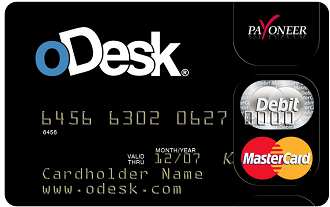
About two months ago, I signed up for oDesk's debit card under Payoneer. Since I've been having problems with Unionbank's EON, I thought it would be advisable to try an alternative. Going through oDesk forums and some blogs show that Payoneer's service is good, stable and fast. The card itself is free, but there are monthly charges as well as transaction charges. Still, as an option to get my money from oDesk, I think it was worth trying out.

black-card-small.PNG

Signing up is easy. oDesk users can do so from the Payments tab of their control panel, then choose Payment options. Non oDesk users can also avail of it through Payoneer's website. Payoneer is a debit card that doesn't need a bank account, and works with Mastercard.

I didn't have much trouble signing up, although my initial application was severely delayed so I had to send an email asking for an update. After that, all I had to do was send a scan of a valid ID. They're rather strict with this and will accept only National IDs. I used my passport and had no trouble with it. In about a month's time, my application was approved and I got my card a few weeks later.

I was able to use my card to verify my Paypal, but to cash out, Payoneer is my main option for now. Here's how it goes:

In oDesk, click "Payments" in your control panel at the top of the screen and choose "Withdrawals". In the next page, choose your withdrawal method from the drop down box. If you have only one option, choose that. Note the charges that will be applied on the withdrawal method you choose.

payoneerfig1.jpg


Once your method is chosen, you will be given an option to choose how much you will take from your account. You can pick their the full amount or specify a smaller one. Note that the withdrawal fee will be deducted from the amount you will withdraw if you choose to take all the money, or from the remaining balance if you don't.

Payoneer's fees are as follows:
US$ 2 - oDesk to Payoneer
US$ 9.95 - Card activation (if you are lucky to get the card with no activation fee, you don't have to worry about this)
US$ 3 - monthly activation fee if the card has balance but no activity for a month
US$ 1- monthly activation fee if the card has balance and has a minimum of two activities for a month (withdrawal or using the debit card for purchases, etc)

Withdrawing funds usually takes about three days, but if you want to get your money immediately, you can pay Payoneer $3 and you'll get the money transferred to your card in about two or (or less). There's also a fee for every withdrawal ($2.15/transaction). I've only tried using BDO ATMs. Balance inquiry is free but when you are withdrawing bigger amounts of money, you get charged a fee. I remember withdrawing P9500 from an account that had P10,000 but when I checked my balance after I was surprised to see that I had only P200 left.

If I am not mistaken, I was charged the $2.15 withdrawal fee and possibly a fee from the bank because I took out more than P5000. I lost nearly P500 for that withdrawal alone, not counting the $3 charged so I could get my money immediately, and the $2 fee for oDesk to Payoneer transfer. It really hurts more when you see it in your local currency.

Payoneer is a great option if you need your money immediately, though in my honest opinion, the charges are quite high and would be a disadvantage if you are earning just enough. However, there are ways where you can minimize your charges, such as looking for a bank that has higher withdrawal limit and getting your money from oDesk to Payoneer at least four days before you need it. Again, Payoneer is a great alternative to Paypal if you don't have one.

For a more in depth discussion about Payoneer use in the Philippines, I turn you over to this thread at the oDesk forums. It's very informative & reading through the replies will get you answers to most questions you might have.

Thursday, April 16, 2009

Testing: MarsEdit 2

A few weeks ago, I joined a contest in MacAppStorm. The price was a license for the Red Sweater blogging software for Mac OSX, MarsEdit. All one has to do was leave a comment on the post or follow the blog on Twitter. Since I already had them on my Twitter, I decided to post a comment.

My DSL was out Tuesday night, so it wasn't until I went to work the next day did I see the results. I wasn't really expecting anything, so I didn't read the entry immediately, checking out my other feeds first. To my surprise, I actually won the contest.

I'm testing it out right now. Installation... there wasn't any. After extracting the file and dragging it to my applications folder, that was it. Open it and I was ready to go.

I added my four blogs including this one, and am using/used MarsEdit to write this post. It's rather nice to see all my tags/categories listed on the side of the post pane. My usual problem with tags is I forget which ones I have and sometimes I end up making new ones.

I like how the main window works like an email client, or iMail. I see my blogs on a list on one side, then the twenty most recent posts, and if I click on those, I get a preview at the bottom pane. Nice. I don't have to browse through my blog's pages to find a post or so about this or that. I can do a search here.

Biggest plus? It frees up space on my browser, and I don't have to worry about losing my entry should in any case the server or the Internet connection fails while I'm publishing.

So far, in this very brief use of MarsEdit, I find it very convenient. I'm looking forward to using it more in the future.

Many thanks to the folks of MacAppStorm and MarsEdit for this software. I consider it as an excellent birthday gift!

Thursday, April 02, 2009

MacHeist 3 Bundle: 5 days to go!

I'm sure most Mac users have heard of MacHeist. The site where you can solve puzzles and get free Mac applications that would normally set you back a couple of dollars. Given that many of these apps are truly useful and cost more than what I'm willing to shell out, taking time to try and solve these puzzles is worth it.

MacHeist 3 is the latest of the series of puzzles. Solving all mini heists would give you many apps such as Fresh, Shovebox, Process, Overflow and EventBox, to name a few. What's more, certain puzzle give you discounts on the bundle that MacHeist will (or in this case, already is) selling at the end of each Heist.

So what is this MacHeist bundle? Well, think of it as several top Mac apps, most of which will cost more than $10 each. We're talking about screenshot apps (Little Snapper), audio editing and recording tools (WireTap Studio), photo editing tools (Picturesque, Acorn), recipe tools (SousChef), 3D animation software (Kinemac), even a few games.

Some of these apps don't come cheap. Kinemac alone is worth $299, while WireTap Studio is $69. Two apps and that's already $368! I definitely won't spend that much for these apps. But toss this into the bundle, along with other great apps for only $39 (less if you got the discounts during the mini heists)? I'd say that's more than worth the price.

If you purchase the bundle, a part of it will go to charity, and for every certain amount sold, a new app is unlocked. WireTap Studio was unlocked when the $300,000 goal was reached, and BoinxTV is next when the money raised for charity reaches $400,000. The last app to be unlocked would be Espresso, which retails for $80. With only five days left, there's still alot to go before the next app is unlocked. I'm hoping all apps get unlocked, because one: think of all that money donated to charity and two: the apps. Sweet deal.

You can check out the apps in the bundle at MacHeist. Get yours and make you Mac and yourself happier with all the nifty tools.

Friday, March 13, 2009

Wrong word, right use (or vice versa)

One of the biggest mistakes a writer nowadays can commit is relying too much on their word processor's spell check feature.

Don't get me wrong. I use the spell checker myself and find it a very good tool in helping me easily spot mistakes in spelling and even grammar usage. However, you shouldn't be too confident that it will spot all your mistakes and provide you with the correct word to use when you need it. A spell checker has it's limits, and because of these limits you may end up with a badly written piece than a well made one.

Photobucket
Photo courtesy of: Stock Exchange


It only checks wrong spelling
Obviously, as it is a spell checker. A word that doesn't match any word in the word processor's data base will be marked wrong, even though you know it exists and your dictionary says so.

It will not correct wrong word usage if the word is spelled right
Many writers, even those who are native English speakers, often switch words that sound the same but are not spelled the same. Here are some examples:

Lose - Loose
Bare - Bear
Hare - Hair
Hale - Hale
Hart - Heart
Fair - Fare
Write - Right
Site - Sight
Sore - Soar

Take this sentence. "With this diet, I'm sure to lose a few pounds so my clothes will all be loose."

Both words of different spelling are used here, and it's clear what each word means. Switch them and the reader still knows what you mean, but if a professional is looking at your work and you are looking for a job (a writing one at that), you might lose points for that mistake.

It is specific only to one kind of English at a time
My spell checker is set to American English. If I decide to spell my words the British way --- with the additional 'u' in some words, or 's' instead of 'z', I'm sure to get an error.

In relation to that, if I use words that are not common in the American English vocabulary, it will be marked wrong.

It won't help much if you write in another language
I experience this a lot, especially if I'm writing or editing Tagalog text. You'll never see so many red squiggly lines under so many words in just one document page! It's worse when the word processor automatically corrects the words. "Undo" is my best friend. Either that, or I turn off the spell checker.

Grammar is checked, but sometimes, it's also wrong
Grammar mistakes are denoted with green squiggly lines. Do a right click over them and you're likely to see something that says "Fragment" and a suggestion on what would make your sentence sound better. I suggest you read it aloud to see if it will work. Better yet, read the whole paragraph aloud to see if the suggested changes would be appropriate, because sometimes, it really isn't.

I'm not saying you do away with the spell checker completely. Many times I just ignore the suggestions, as the marks don't really disturb anyone but me. Then again, I do make mistakes and the spell checker does help easily spot errors with misspelled words.

However, learn to judge when its suggestions are right or wrong. Sometimes the spell checker is a pompous know-it-all that marks things wrong when they aren't. If in doubt, consult a dictionary, and when you're done writing, read it over twice, then ask someone to read it over twice as well. A fresh set of eyes may spot mistakes that you may have missed. Even the most famous authors make a mistake when they write, and it's their editor's job to help them correct them.

Happy writing!

P.S. I didn't encounter any red lines while typing this, but that doesn't mean it doesn't have errors! If you spot any, let me know. :)

Thursday, February 26, 2009

Working on the new Safari

If you haven't updated yet, check out Safari Beta 4, available now for download at the Apple website.

I installed it last night and I must say it's performing really great. The sites are loading much faster than they do in my Firefox. I love the Top Sites, which is somewhat the default "homepage" when you load Safari or open a new tab. It's like Cover Flow for your browser, and it looks so sleek and smooth. As you browse, Safari will note the sites you most often visit and put in on your top sites. You can edit it and pin the sites you most visit so that Safari won't change it.

I've yet to see the other changes Safari has for this release, but so far I'm loving it.

OSX Leopard users would have to update their system to 10.5.6 as well as to the new Security update. Took me a few minutes to run all that before I could install Safari.