Great news for all oDesk contractors in the Philippines! oDesk is now offering local funds transfer, where you can directly deposit your earnings into your Philippine bank account for a low, flat fee. This eliminates the need for a third party vendor, such as Payoneer or PayPal. Instead, all your money goes directly to your bank account (in pesos too!) through the local clearing system.
It takes 3 to 5 business days for your funds to be properly transferred. Local funds transfer in the Philippines is still in the beta stage, but oDesk assures contractors that the system is sound and their money is in good hands. It's in the beta stage because they know it can improve in the future.
Setting up the local funds transfer is a one-step activation process. You just need your bank's head office BRSTN code, your account number and information. While oDesk charges $1.99 for each transfer, you may incur other charges, such as incoming remittance fees. It's best to ask if your bank has other charges when receiving a BRSTN local funds transfer. oDesk did mention that due to their existing tie-ups with several local banks, these fees won't be very steep.
For a complete list of details, please view this post at the oDesk website. You can also check out the discussion thread. A lot of my questions have been answered just by reading through it.
I'm going to sign up for this. I'm currently using Payoneer and the fees are killing me. Imagine a $20 transfer will incur up to more than $5 in fees just to get the money to Payoneer. I think it's fast and convenient, but not worth it if you're only going to be transferring minimum amounts. I'm trying out Paypal which is somewhat cheaper (transfer from Paypal to local bank, charges may apply too).
This service is open to all Philippine oDesk contractors. Other countries have their own local funds transfer too. It sounds like a very easy solution for all our withdrawal woes (hoy, wag ka bastos! :p) I'm glad oDesk decided to bring this service to us. I can't wait to try it, especially since according to that post, BPI doesn't have any incoming remittance charges! :D
Have you tried this? Will you sign up for it? I'd love to hear about your experience if you have.
January 2012 Update: I was able to try this a few months after I posted this. When my account reached a little over PHP 10,000, I facilitated the transfer. It was pretty quick, and it took less than two days to get from my oDesk account to my BPI savings account. And yes, no remittance charges (compared to transferring from PayPal to BPI).
Showing posts with label payment options. Show all posts
Showing posts with label payment options. Show all posts
Thursday, February 10, 2011


Sunday, June 14, 2009
oDesk Mastercard: Alternative way to get paid
About two months ago, I signed up for oDesk's debit card under Payoneer. Since I've been having problems with Unionbank's EON, I thought it would be advisable to try an alternative. Going through oDesk forums and some blogs show that Payoneer's service is good, stable and fast. The card itself is free, but there are monthly charges as well as transaction charges. Still, as an option to get my money from oDesk, I think it was worth trying out.
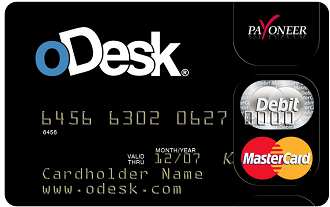
Signing up is easy. oDesk users can do so from the Payments tab of their control panel, then choose Payment options. Non oDesk users can also avail of it through Payoneer's website. Payoneer is a debit card that doesn't need a bank account, and works with Mastercard.
I didn't have much trouble signing up, although my initial application was severely delayed so I had to send an email asking for an update. After that, all I had to do was send a scan of a valid ID. They're rather strict with this and will accept only National IDs. I used my passport and had no trouble with it. In about a month's time, my application was approved and I got my card a few weeks later.
I was able to use my card to verify my Paypal, but to cash out, Payoneer is my main option for now. Here's how it goes:
In oDesk, click "Payments" in your control panel at the top of the screen and choose "Withdrawals". In the next page, choose your withdrawal method from the drop down box. If you have only one option, choose that. Note the charges that will be applied on the withdrawal method you choose.

Once your method is chosen, you will be given an option to choose how much you will take from your account. You can pick their the full amount or specify a smaller one. Note that the withdrawal fee will be deducted from the amount you will withdraw if you choose to take all the money, or from the remaining balance if you don't.
Payoneer's fees are as follows:
US$ 2 - oDesk to Payoneer
US$ 9.95 - Card activation (if you are lucky to get the card with no activation fee, you don't have to worry about this)
US$ 3 - monthly activation fee if the card has balance but no activity for a month
US$ 1- monthly activation fee if the card has balance and has a minimum of two activities for a month (withdrawal or using the debit card for purchases, etc)
Withdrawing funds usually takes about three days, but if you want to get your money immediately, you can pay Payoneer $3 and you'll get the money transferred to your card in about two or (or less). There's also a fee for every withdrawal ($2.15/transaction). I've only tried using BDO ATMs. Balance inquiry is free but when you are withdrawing bigger amounts of money, you get charged a fee. I remember withdrawing P9500 from an account that had P10,000 but when I checked my balance after I was surprised to see that I had only P200 left.
If I am not mistaken, I was charged the $2.15 withdrawal fee and possibly a fee from the bank because I took out more than P5000. I lost nearly P500 for that withdrawal alone, not counting the $3 charged so I could get my money immediately, and the $2 fee for oDesk to Payoneer transfer. It really hurts more when you see it in your local currency.
Payoneer is a great option if you need your money immediately, though in my honest opinion, the charges are quite high and would be a disadvantage if you are earning just enough. However, there are ways where you can minimize your charges, such as looking for a bank that has higher withdrawal limit and getting your money from oDesk to Payoneer at least four days before you need it. Again, Payoneer is a great alternative to Paypal if you don't have one.
For a more in depth discussion about Payoneer use in the Philippines, I turn you over to this thread at the oDesk forums. It's very informative & reading through the replies will get you answers to most questions you might have.
Signing up is easy. oDesk users can do so from the Payments tab of their control panel, then choose Payment options. Non oDesk users can also avail of it through Payoneer's website. Payoneer is a debit card that doesn't need a bank account, and works with Mastercard.
I didn't have much trouble signing up, although my initial application was severely delayed so I had to send an email asking for an update. After that, all I had to do was send a scan of a valid ID. They're rather strict with this and will accept only National IDs. I used my passport and had no trouble with it. In about a month's time, my application was approved and I got my card a few weeks later.
I was able to use my card to verify my Paypal, but to cash out, Payoneer is my main option for now. Here's how it goes:
In oDesk, click "Payments" in your control panel at the top of the screen and choose "Withdrawals". In the next page, choose your withdrawal method from the drop down box. If you have only one option, choose that. Note the charges that will be applied on the withdrawal method you choose.
Once your method is chosen, you will be given an option to choose how much you will take from your account. You can pick their the full amount or specify a smaller one. Note that the withdrawal fee will be deducted from the amount you will withdraw if you choose to take all the money, or from the remaining balance if you don't.
Payoneer's fees are as follows:
US$ 2 - oDesk to Payoneer
US$ 9.95 - Card activation (if you are lucky to get the card with no activation fee, you don't have to worry about this)
US$ 3 - monthly activation fee if the card has balance but no activity for a month
US$ 1- monthly activation fee if the card has balance and has a minimum of two activities for a month (withdrawal or using the debit card for purchases, etc)
Withdrawing funds usually takes about three days, but if you want to get your money immediately, you can pay Payoneer $3 and you'll get the money transferred to your card in about two or (or less). There's also a fee for every withdrawal ($2.15/transaction). I've only tried using BDO ATMs. Balance inquiry is free but when you are withdrawing bigger amounts of money, you get charged a fee. I remember withdrawing P9500 from an account that had P10,000 but when I checked my balance after I was surprised to see that I had only P200 left.
If I am not mistaken, I was charged the $2.15 withdrawal fee and possibly a fee from the bank because I took out more than P5000. I lost nearly P500 for that withdrawal alone, not counting the $3 charged so I could get my money immediately, and the $2 fee for oDesk to Payoneer transfer. It really hurts more when you see it in your local currency.
Payoneer is a great option if you need your money immediately, though in my honest opinion, the charges are quite high and would be a disadvantage if you are earning just enough. However, there are ways where you can minimize your charges, such as looking for a bank that has higher withdrawal limit and getting your money from oDesk to Payoneer at least four days before you need it. Again, Payoneer is a great alternative to Paypal if you don't have one.
For a more in depth discussion about Payoneer use in the Philippines, I turn you over to this thread at the oDesk forums. It's very informative & reading through the replies will get you answers to most questions you might have.
Subscribe to:
Posts (Atom)